Book Projector Guide 2026: Types, Top Picks, Prices & How to Choose
Are you unsure of what a book projector is? Check out the storybook projectors, document cameras, and the top selections based on the case of use, price, and features.
Book Projector: The Complete Guide to Types, Top Products, and Buying the Right One
Search for “book projector,” and you’ll find two worlds in one search result: a bright toy for infants in bed and classroom equipment that is professional for teachers. It’s simply an unlabeled division of classification that many buying guides do not take enough time to explain.
This guide can help fix this. It doesn’t matter if you’re a mum trying to get a toddler to sleep, a teacher looking to read the same book to 30 children simultaneously, or someone who prefers reading on the wall instead of the screen; you’ll be able to determine the exact type of book projector to purchase and which products are worth a look.
What Is a Book Projector, Exactly?
The book projector a device that project the contents of the book, like its illustrations, text pictures, or narrative to ceilings, walls or screens instead of holding the book.
This single word covers two distinct product categories:
- Storybooks or nighttime story projectors: children’s devices that project illustrations, usually with narration, as part of the routine for bedtime.
- Document camera (visual presentation tools) — professional tools that record the live video feed of an actual, physical book page, and transmit it to a projector or screen that is used by librarians, teachers and offices.
A third and smaller category also exists: people who have a home-based or portable projector and join it with a laptop or tablet to display a book on the wall. It’s a DIY installation and not a “book projector” product, but it’s something worth considering as a different option.
Who Actually Needs One (and Why)?
When comparing products, it is important to determine the category that you’re in, since purchasing the wrong item is a common mistake.
Children and parents typically want a peaceful and screen-free option to tablets to use at bedtime. They require a low-brightness setting, an auto-shutoff feature, and enough variety of stories to prevent fatigue from repetition.
Librarians and teachers must show the actual book- the one they hold they hold to the entire room in real time. A story library that is preloaded cannot show that. Only an actual document camera can.
Notaries, offices, and trainers employ document cameras to accomplish the same thing for displaying forms, contracts, or printed material in real-time during a conference or session.
Readers who have low vision often make use of a general-purpose projection device to display larger digital book pages on the wall. This is an entirely different set-up in comparison to the two categories above.
How Each Type Actually Works?
Projectors for storybooks are operated by an easy mechanism in which, when you insert a cartridge or disc, an LED is reflected through the printed frame, and a lens directs it onto the ceiling or wall. A lot of models come with built-in speakers that play recorded narration or soft music. The majority of them come with a timer that turns off the unit immediately after 10- 20 minutes.
Cameras for documentaries are much like a webcam that is crossed with the projector. When you place a book on the camera’s arm, the camera takes a live feed of the book, and the video feed is then sent typically via HDMI or USB to a screen or separate projector within the room. Autofocus and zoom controls let you control the amount of detail viewers can see, and some cameras can capture the video or make annotations on the screen.
The main difference you need to be aware of with the storybook projector is that it displays its stories. A document camera shows you your book live.
Storybook Projector vs. Document Camera: Quick Comparison
| Factor | Storybook Projector | Document Camera |
| What it demonstrates | Pre-loaded discs/cartridges | Any physical book page |
| Best for | Ages 2-8, approximately. | Offices, classrooms, libraries |
| Source of power | Battery or plug-in | Usually, it’s connected by USB |
| Do you require an additional screen? | None (projects directly) | Often yes, unless bundled |
| Story Variety | Fixed library | Unlimited (any physical book) |
| Portability | High | Moderate |
Top Book Projector Products Worth Considering
This is where the theory meets the shelf. These products are from both categories — children’s storybook projectors and classroom-grade document cameras- since “book projector” shoppers genuinely look for both. Pricing is provided in broad ranges, as the price varies according to bundle, retailer, as well as location.
| Product | Type | Best For | Typical Price Range |
| Moon lite Storybook Projector | Storybook (kids) | Travel, bedtime stories for children. | $30-$60 |
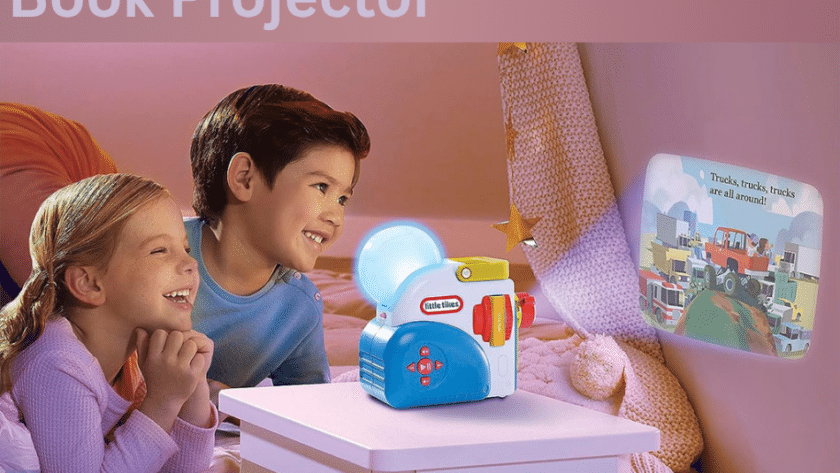
| Little Tikes Story Dream Machine | Storybook (kids) | Full-room projection storytelling using audio | $50-$100 |
| Munchkin Sound Projector / Night Light | Storybook (infant) | Children who require soft light patterns but no stories to read | $15-$30 |
| Multi-disc generic storybook projector for flashlights | Storybook (kids) | Kids can have a budget-friendly bedtime routine as well as gifts to give | $10-$25 |
| IPEVO V4K Ultra HD | Document camera | Classroom and hybrid employ | $150-$250 |
| ELMO MX-P2 | Document camera | Professional-grade image clarity designed for the most difficult classrooms | $400-$700+ |
| AVer U50 | Document camera | Durable, school-district-grade daily use | $200-$400 |
| HUE HD Pro | Document camera | Affordable classrooms Art and demonstrations of craft | $80-$150 |
1.Moon lite Storybook Projector:

It is built on a basic concept: a small projector attachment, much smaller than a wallet, which is attached to phones and projects a page image onto the wall as parents read the physical book aloud. It is compatible with a wide selection of picture-book licensed titles that are available as tiny picture discs.
This means that the content of a story can grow as time passes, instead of being permanently fixed. Since it relies on your phone as a source of light and the application is extremely portable, it’s truly pocket-sized for travel and hotel stays or even a grandparent’s home. It favours narration by parents instead of the fully automated narration that certain families prefer to use for the bonding element of reading together.
2.Little Tikes Story Dream Machine:

It uses a completely different strategy: it’s a separate, complete, fully-featured machine designed to fill a whole ceiling or wall with a projected story and voice narration, as well as sound effects. It’s targeted towards the more immersive side of storytime entertainment, which is often focused around well-known characters for children and interactive storybooks.
Since it’s a standalone device, not an app for phones, it doesn’t require an app, and some parents opt to have a simple and uncluttered peace of mind. It’s typically priced at a more expensive price than disc projectors with basic features due to its more extensive capacity and quality of build.
3.Multi-disc generic storybook flashlights:

These are the most budget-friendly models of this class — tiny, flashlight-shaped units that are sold under a variety of brand names and usually packaged with multiple interchangeable discs. They’re low-cost, battery-powered, and easy enough for children to operate on their own, which makes them popular as gifts and stocking-stuffer items.
Quality of construction and disc selection differ greatly between vendors and reviews, so examining them for the clarity of the lens and battery longevity is more important when it comes to name-brand products. It’s a good, low-risk way to determine if a child really enjoys reading story time before investing more.
4.IPEVO V4K Ultra HD:

This is among the top document cameras, which are ideal for classrooms, mainly because it can maintain image quality and simplicity of use, and is priced less than other cameras. It features a camera with 8 megapixels which ensures clear images and text, regardless of the big screen in the classroom. It also has an simple USB plug-and play interface for Chrome publications, Windows, and Mac systems.
Teachers often mention the speed of autofocus as an important benefit, as it can keep up with the rapid pace of changing from a photo book to worksheets, and even an object in 3D, with no lag. It’s a great option for any school or teacher purchasing their first camera for documentation.
5.The ELMO MX-P2:

This is at the top end of the document camera market. It is designed for classrooms and training settings where image quality is crucial — high-quality printing, high-quality illustrations, or even lab work. It usually employs manual focus instead of autofocus, which professionals tend to prefer once they’ve gotten used to setting a constant working distance.
The quality of the build is a constant feature in the reviews, with stronger joints and bases that are more robust than budget models; that’s important for classrooms, where the equipment is constantly pushed to the limit. Cost is a factor that is a bit higher than the entry-level models, and therefore is ideal for departments or schools that are already aware of the need for high-end image quality.
6.AVer U50:

It is advertised as a sturdy choice for mid-priced schools looking for equipment that is able to withstand years of classroom handling. It’s often placed alongside the ELMO MX-2 as one of the most physically sturdy cameras in its price range, and has stronger joints and a more solid base as opposed to flexible neck alternatives.
It is compatible with the traditional classroom workflow, which involves linking to the projector or an interactive display using USB or HDMI, and includes the type of support from the US and documentation that IT departments are known to appreciate. It’s a decent middle-of-the-road choice among the lower-cost IPEVO models and the more expensive ELMO models.
7.HUE HD Pro:

It is the cost-effective option for schools that need accurate colour accuracy, particularly for art, craft or science demonstrations that need accurate colour reproduction. Its gooseneck design can be flexed and allows it to turn over a page of a book, drawing, or any other smaller item, however the same flexibility ensures that it is a little more gentle handling than its rigid-arm counterparts.
It can handle the basic needs with live display, projector, or display connections — but does not have the more advanced zoom or annotation options that are available in more expensive models. Teachers on a budget who have to show basic materials and book pages. It provides the essentials with little expense.
How to Choose: A Simple Decision Framework.
Start by asking a question:
Can you picture a sleeping child or a room filled with readers of an ebook?
Suppose it’s time to go to bed; use the storybook projector. It is recommended to choose dimmable lighting, an auto-shutoff timer, and a sufficient number of stories to prevent repetition.
- If it’s a classroom library or office then you should use the document camera. Prioritize autofocus, the kind of interface (HDMI/USB) and long-term durability if the camera is going to be used often.
- If you already have projectors and would like to display the digital book, leave out both categories and connect your projector to a laptop or tablet running the PDF or ebook.
Check the cost: Basic projection systems for children’s books range from $10 to $100. Cameras that can be used for documentaries, which can be considered entry-level, start around $ 80- $ 250. Professional models start at $400-$1500. This is particularly true if they’re used in conjunction with a projection system that is short-throw.
Setup Tips and Common Mistakes:
Certain practices that are a good idea can be a huge difference regardless of the type of product you buy.
For projections that tell stories, place the projector 3 to 6 feet from the wall or ceiling to get a clear picture (check the manual for the model you have chosen for specifics and throw distances, since they differ). Select the smallest setting to ensure that it’s clear. Additionally, you can count on the auto-shutoff feature that will allow you to use the projector for an extended period of time, instead of letting the projector on for a prolonged duration of duration.
Document cameras: Be aware of direct overhead lighting that can cause reflective areas or hot spots to the pages. Utilize either an eBook stand or weighed page holder to ensure that the pages remain straight and level.
Also, always verify the connection of HDMI or USB to your display prior to when an event or class begins instead of after it.
The most frequent error in this area is purchasing the wrong kind of camera, thinking that a kid’s storybook projector can display every book you own or that an electronic camera can provide a relaxing sleep-time experience that is preloaded. They can solve various issues, and ensuring that the camera is matched to the intended use will avoid most buyer’s remorse.
A note of caution to remember: Keep the brightness at a minimum and do not point any projector directly in children’s eyes, particularly when it is used at night without supervision.
Where to Buy?
Storybook projectors for children are available at a variety of major online markets, retailers, and toy or baby goods stores. Document cameras are usually available through electronic suppliers and companies for education/AV that often provide discounts in bulk and assistance for schools. If you’re in search of a local vendor, “document camera supplier” or “classroom AV equipment” tends to bring up the correct kind of business, whereas “storybook projector” searches lean towards baby and toy retailers, which are worth looking at independently, as they seldom cross-check each other.
FAQ
1.What’s the purpose of a book projector?
It’s used to show books — either preloaded illustrations that are loaded onto kids’ devices or an actual live feed of an actual book page using document cameras -onto the ceiling, wall, or a screen for sharing, as well as hands-free watching.
2.Are projectors for storybooks suitable to help a child get ready for bed?
Yes. A lot of parents utilize them as a non-screen alternative to tablets, displaying calm, illustrated scenes and an automatic shutoff feature so that the device is shut off when the child has fallen asleep.
3.Can a book projector display any book I own?
Only document-camera-style projectors can show any physical book in real time. Projectors for storybooks designed specifically for children can only be used with their built-in cartridges or discs.
4.What’s the distinction between a book projector and a document camera?
A kids’ book projector shows an unloaded collection of stories, while document cameras capture a live feed of a book’s physical pages and forward it to a projection device or display specially designed for different uses.
5.What is for book projectors?
Kids’ storybook projectors are typically priced from $10 to $100. Document cameras cost anywhere from $80 and $120 for the cheapest models and $1,500 or higher for the best bundles for classrooms.
6.Do book projectors need Wi-Fi or a program?
Most basic storybook projectors are able to operate entirely offline with the use of physical discs. Document cameras usually connect via USB and HDMI to a screen or a computer. They do not typically require internet connectivity for operation.
7.Do you have a book-projector that is suitable for children’s eyes?
Use the lowest appropriate brightness setting, and make sure that the projector is not placed directly towards children’s eyes. Set the auto-shutoff option for the time when it is bedtime. These are the norms for all devices that emit light in a child’s bedroom.
8.What is the age range for suitable projectors for an illustrated book?
Most storybook projectors are aimed at between 2 and 8, although projects with lighter patterns that don’t contain stories are usually designed for infants starting at the time of birth.
9.What camera for documentaries is the most suitable for a student who is buying a camera for classes? Entry-level models like the IPEVO V4K are often recommended as a great starting point since they are simple plug-and-play configurations with excellent image quality, which can be viewed on the huge screen of the classroom.
Conclusion
“Book projector” isn’t one product, but rather a category that is divided into children’s bedtime gadgets as well as the most expensive book display equipment, and being aware of the position you’re on is your ultimate purchase choice. Parents should think about using book projectors to display stories like Moon Lite and Little Tikes’ Story Dream Machine, with a particular focus on brightness control and auto shutoff security.
Teachers and offices ought to look into document cameras like the IPEVO V4K and the ELMO MX-2 that focus on the performance of autofocus as well as connectivity compatibility. Be sure that the camera you choose meets the requirements of your business. First, take a look at some specific choices within this segment. Other factors in your selection — like price, features, or the retailer are likely to fall into place quickly.
These information about Book Projector are gathered from different surveys, medical tests and tech giants like Amazon, Techradar and more. Our top priority is to provide you valuable information about Book Projector.
For More Details About Different Projectors Click Here